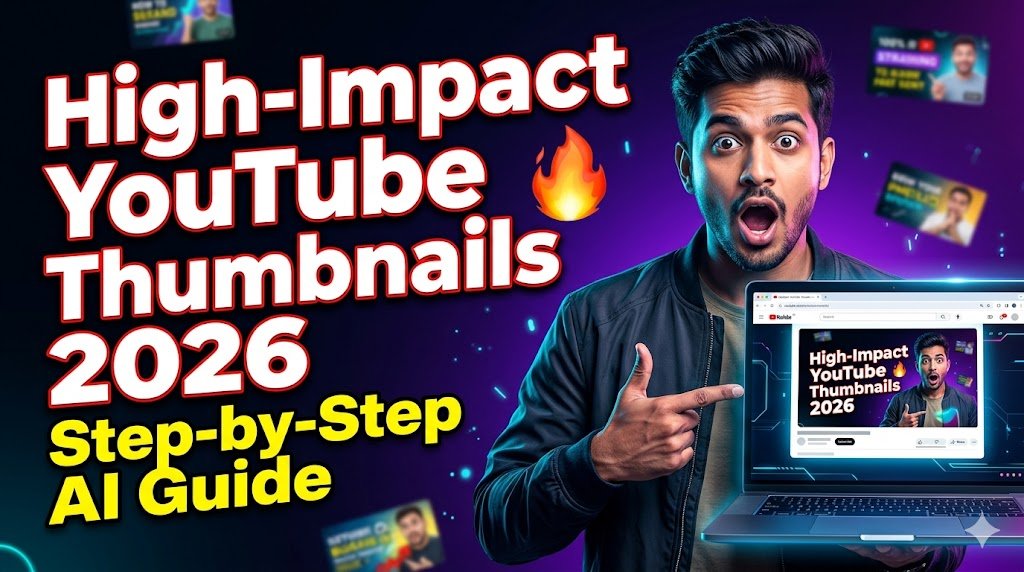

New Delhi, 3 June 2026 – As YouTube’s algorithm places ever‑greater emphasis on click‑through‑rate, creators are turning to AI‑driven design to produce thumbnails that grab attention within seconds. TodayVacancy.in brings you a concise, news‑style briefing on the exact process to generate a professional‑grade thumbnail, complete with a ready‑to‑use prompt and a practical workflow that works for both beginners and seasoned video makers.
Introduction
YouTube reports that a compelling thumbnail can increase a video’s click‑through‑rate (CTR) by up to 30 %. While traditional graphic‑design software remains popular, the rise of text‑to‑image generators (e.g., Midjourney, DALL‑E 3, Stable Diffusion) now lets creators produce ultra‑modern, high‑resolution visuals in minutes. The key is a well‑structured prompt that tells the AI exactly what you need – colour palette, composition, text styling, and emotional cues.
The guide below translates the reference prompt into actionable steps, shows which tools are best suited, and provides a ready‑made prompt that you can copy‑paste into any leading AI image generator.
1. Why Thumbnail Design Matters in 2026
| Impact Area | Typical Outcome | Reason for Focus |
|---|---|---|
| Click‑Through‑Rate (CTR) | +15 % to +30 % | First visual impression drives user decision |
| Watch Time | Higher retention | Consistent visual branding sets viewer expectations |
| Channel Authority | Professional look | Premium thumbnails signal quality content |
| Algorithmic Boost | Better ranking in “Suggested” | YouTube rewards higher CTR and watch time |
2. Technical Foundations – 16:9 Aspect Ratio & Resolution
| Specification | Recommended Setting |
|---|---|
| Aspect Ratio | 16 : 9 (standard YouTube player) |
| Resolution | 1280 × 720 px (minimum) – 1920 × 1080 px for premium quality |
| File Format | JPEG (≤ 2 MB) or PNG (transparent background) |
| Colour Space | sRGB (web‑safe) |
A mismatch in aspect ratio leads to automatic cropping by YouTube, which can cut off crucial elements such as text or facial expressions.
3. Crafting the Perfect Prompt – From Idea to AI Output
3.1 Break Down the Prompt Components
- Main Subject – Who or what is the focal point?
- Background – Mood, gradient, colour accents.
- On‑Screen Text – Font size, colour, outline, hierarchy.
- Style & Lighting – Cinematic, high‑contrast, vibrant.
- Additional Elements – Emoji, symbols, shadows, glow.
3.2 Example Prompt (Copy‑Ready)
Create a highly clickable YouTube thumbnail in 16:9 aspect ratio, ultra-modern and professional style.

Main subject: a shocked young Indian man with wide eyes pointing at a glowing laptop

Background: dark gradient with subtle neon accents in blue and purple, high contrast.

Text on thumbnail:
- Big bold main text: "YOUR MAIN TITLE" in large white font with red outline
- Smaller sub text: "YOUR SUBTITLE" in yellow

Style: cinematic lighting, sharp details, vibrant colors, emotional expression, clickbait style but premium quality, high resolution, trending YouTube thumbnail design 2026.

Add these elements:
- Eye‑catching symbol: 🔥
- Strong facial expression
- Slight shadow and glow effects on text
Tip: Replace YOUR MAIN TITLE and YOUR SUBTITLE with the exact wording you want viewers to read. Keep the main title under 6 words for maximum readability.
3.3 Prompt‑Writing Checklist
| Checklist Item | Yes/No |
|---|---|
| 16:9 aspect ratio specified? | ✅ |
| Main subject described with emotion? | ✅ |
| Background colour scheme defined? | ✅ |
| Text hierarchy (main vs. sub) detailed? | ✅ |
| Font colour, outline, and effect noted? | ✅ |
| Style adjectives (cinematic, vibrant) included? | ✅ |
| Extra visual cue (emoji/symbol) added? | ✅ |
| Resolution hint (high‑resolution) mentioned? | ✅ |
4. Selecting the Right AI Image Generator
| Tool | Free / Paid | Key Feature for Thumbnails |
|---|---|---|
| Midjourney | Paid (subscription) | Consistent style with “–ar 16:9” flag |
| DALL‑E 3 (OpenAI) | Free tier + pay‑as‑you‑go | Strong text rendering, built‑in safety filters |
| Stable Diffusion (Automatic1111 UI) | Free (self‑hosted) | Full control over model checkpoints & upscaling |
| Canva Text‑to‑Image | Free & Pro | Integrated editing canvas for quick tweaks |
Recommendation: For creators who need fast turnaround and reliable text quality, DALL‑E 3 is the most straightforward. Midjourney excels in cinematic lighting, while Stable Diffusion offers the deepest customization for those comfortable with local installations.
5. Fine‑Tuning the Output
- Upscale – Use the AI’s built‑in upscaler (×2) or a dedicated tool like Topaz Gigapixel AI to reach 1920 × 1080 px without quality loss.
- Add Shadows & Glow – Import the image into Canva or Photoshop; apply a subtle outer glow to the text layers (3‑5 px, opacity ≈ 40 %).
- Check Readability – Zoom to 100 % and confirm that the main title is legible on mobile screens (minimum 40 px font height).
- Export – Save as JPEG (quality ≈ 85 %) or PNG if you need transparency for overlaying on video frames.
6. Uploading the Thumbnail to YouTube
| Step | Action |
|---|---|
| 1 | Open YouTube Studio → “Content” → select the video. |
| 2 | Click the “Upload thumbnail” button. |
| 3 | Choose the edited image file (max 2 MB). |
| 4 | Click Save → verify that the thumbnail appears correctly on both desktop and mobile previews. |
7. Quick Reference Checklist
| ✅ Item | Description |
|---|---|
| Aspect Ratio | 16:9 confirmed in prompt (--ar 16:9). |
| Resolution | ≥ 1280 × 720 px; upscaled to 1920 × 1080 px. |
| Main Subject | Emotionally expressive (shocked, wide eyes). |
| Background | Dark gradient with neon blue‑purple accents. |
| Text Styling | White main title with red outline; yellow subtitle. |
| Additional Symbol | 🔥 placed near the title for visual hook. |
| Post‑Processing | Shadow + glow on text; final export under 2 MB. |
| Upload | Added via YouTube Studio, verified on all devices. |
8. Conclusion
In 2026, AI‑generated thumbnails have become a competitive necessity rather than a novelty. By following the structured prompt above, selecting the appropriate generation engine, and applying a few post‑production tweaks, any creator can produce a click‑magnet thumbnail in under 15 minutes. Implement the checklist, test different colour combinations, and monitor CTR in YouTube Analytics to refine your approach over time.


Important Links
- Join WhatsApp Group: Click Here
- Join Telegram Channel: Click Here
- Join Current Affairs Quiz: Click Here
Can I use the same prompt for different video topics?
Yes. Replace the “main subject” and text fields with content‑specific details while keeping the style instructions unchanged.
Does the AI preserve the exact font I specify?
Most generators render text based on description (e.g., “large white font with red outline”). For precise branding, add the rendered text later in a graphic editor.
How much does a premium AI tool cost for daily thumbnail creation?
Pricing varies; Midjourney starts at around $10 per month for unlimited fast generations, while DALL‑E 3 offers a free tier with limited credits and pay‑as‑you‑go beyond that.
Is it safe to include emojis in the thumbnail?
Emojis are treated as graphic symbols by AI models. They can boost visual appeal but should not replace essential text.
What is the ideal file size for YouTube thumbnails?
Keep the image under 2 MB to ensure fast loading and compliance with YouTube’s upload limits.